Two names you keep hearing
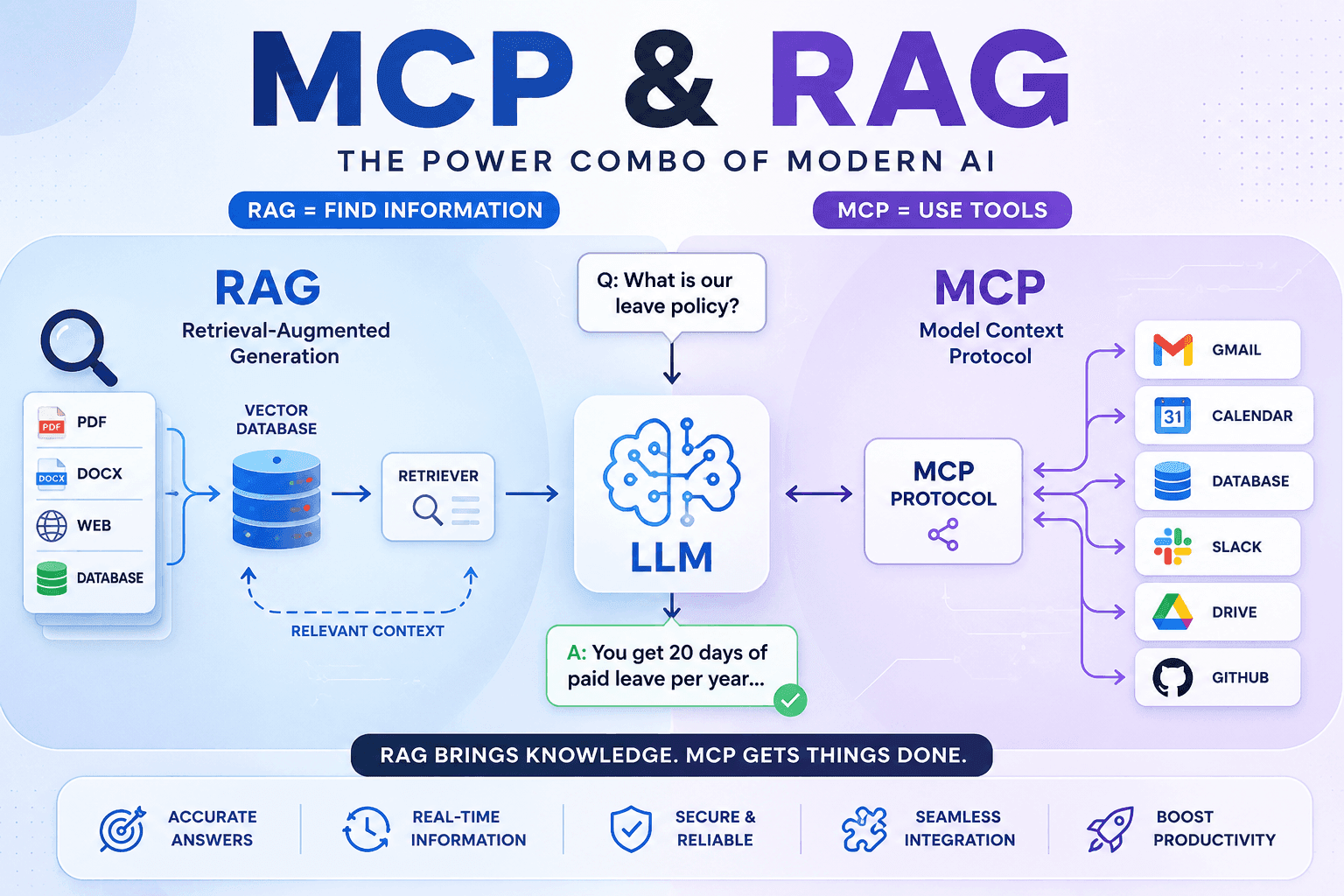
AI is changing how we search for information, write content, answer customer questions, and automate work. Whenever people talk about modern AI applications — ChatGPT, Claude, Gemini, or AI assistants built on top of them — two terms come up constantly: RAG (Retrieval-Augmented Generation) and MCP (Model Context Protocol).
Beginners often assume they're two versions of the same thing. They're not — they solve completely different problems. The short version: RAG helps AI find information. MCP helps AI use tools. Let's go through both properly.
Think of AI as a new employee
Say your company hires someone new. They're smart, but they run into two problems immediately.
Problem 1 — they don't know your documents
HR policy, leave policy, product manuals, customer records — none of it lives in their head. They need a way to search it. That's the gap RAG fills.
Problem 2 — knowing isn't the same as doing
Even once they know the answer, they can't send an email, create a calendar invite, query a database, or upload a file on their own. They need access to the actual software. That's the gap MCP fills.
What RAG actually is
RAG stands for Retrieval-Augmented Generation. In plain terms: before answering a question, the AI first searches trusted information, then builds its answer from what it found — instead of just guessing from what it remembers.
Large language models are trained on huge amounts of text, but that training has a cutoff. Say your company updated its leave policy yesterday — the model has no idea that happened. Without RAG, it answers from outdated memory and may quietly give you the wrong policy. With RAG, it searches the actual current document first, reads it, and answers from that.
The RAG architecture
User asks a question
Question converted to a vector
Vector database searched
Matching documents retrieved
Documents sent to the LLM
LLM generates the answer
What's actually a "vector" here
Computers don't understand words the way people do — everything gets converted into numbers first. The word "apple" might become something like `[0.23, 0.81, 0.52, 0.94, ...]`. That list of numbers is a vector, and vectors are what let AI match on meaning instead of exact wording.
That's why searching for "vacation policy" can still find a document titled "Annual Leave Rules" — a plain keyword search would likely miss it, but a vector search recognizes the two phrases mean almost the same thing.
Two terms worth pinning down before moving on
- Embedding model — the tool that actually does the converting: text in, vector (that list of numbers) out. Nothing more mysterious than that.
- Vector database — just a storage system built specifically to hold a huge number of vectors and find the closest matches to a new one, quickly.
The pieces that make up RAG
The user
Asks a question in plain language — "Where's our refund policy?"
Embedding model
Converts that question (and the underlying documents) into vectors, so meaning can be compared mathematically.
Vector database
Stores those vectors. Pinecone, Weaviate, Milvus, ChromaDB, and pgvector (a Postgres extension) are common choices.
Retriever
Searches the vector database and pulls out the documents that are actually relevant to the question.
The language model
Reads what the retriever found and turns it into a natural-language answer.
Why RAG is worth the extra step
- + Answers reflect your latest documents, not stale training data
- + Meaningfully reduces hallucination
- + No retraining the model every time a document changes
- + Works directly with your own company data
- + Easy to keep up to date — just update the source documents
- − Retrieval adds a search step, which adds latency
- − Bad source documents produce bad answers — garbage in, garbage out
- − Needs a vector database to run
- − Answer quality is only as good as retrieval quality
What MCP actually is
MCP stands for Model Context Protocol. The simplest way to think about it: a common language between AI and software. Without it, every application needs its own custom integration built for it. With MCP, everything speaks the same protocol instead.
Say you ask an assistant to "email today's report to my manager." It understands the request fine — but it can't just log into Gmail on its own. Instead, it sends that request through MCP, which talks to Gmail, which sends the email, and the result comes back to the AI to confirm.
MCP, the USB comparison
Years ago, every phone had its own charger — a mess of incompatible cables. USB-C fixed that by giving everything one shared standard. MCP is doing the same thing for AI-to-software connections: instead of a custom integration per app, everything speaks one protocol.
The MCP architecture
User makes a request
AI assistant interprets it
MCP client sends the request
MCP server routes to a tool
Tool performs the action
Result returns to the user
The pieces that make up MCP
AI client
The model itself — ChatGPT, Claude, or a desktop AI assistant.
MCP client
Handles the actual communication: sends requests, receives responses.
MCP server
Exposes tools to the AI — filesystem access, GitHub, Slack, a database, Google Drive, email, and so on.
The tool
The real software doing the actual work once the request reaches it.
MCP in action
A few concrete examples of the same pattern playing out:
"Open today's sales report"
The request goes to a filesystem MCP server, which reads the file and returns it — the AI then summarizes it.
"Create a meeting tomorrow at 10 AM"
Routed to a calendar MCP server, which creates the event and returns a success message the AI confirms back to you.
"Show the top five customers from the database"
Routed to a database MCP server, which runs the query and returns rows — the AI explains the results in plain language.
Why MCP is worth adopting
- + One standard protocol instead of custom integrations per app
- + Tools are reusable across different AI clients
- + Communication is structured and secure
- + Works across many kinds of applications
- + Meaningfully less integration work per tool
RAG vs MCP, side by side
| Feature | RAG | MCP |
|---|---|---|
| Main purpose | Retrieve knowledge | Connect tools |
| Reads PDFs / documents | Yes | No |
| Reads a database | Through retrieval | Through a tool |
| Sends email | No | Yes |
| Calendar access | No | Yes |
| Uses a vector database | Yes | No |
| Executes actions | No | Yes |
| Generates better answers | Yes | Partly |
| Automation | No | Yes |
Can they work together?
Absolutely — and in practice, most serious AI assistants combine both. Say you ask: "Summarize last month's sales report and email it to my manager."
RAG finds the information
Searches the sales report and generates the summary.
MCP performs the action
Opens the email tool and sends it — success.
A Full Walkthrough: Customer Support Bot
To make this concrete instead of abstract, here's one realistic request traced through both systems, start to finish. A customer types: "My order hasn't arrived and I'd like a refund."
1. The question goes to RAG first
The bot doesn't know your company's specific refund policy out of the box — RAG converts the question to a vector, searches the company's actual refund-policy document, and finds the relevant section (e.g. "orders delayed more than 10 days qualify for a full refund").
2. The AI checks whether this order actually qualifies
Using that retrieved policy text plus the order's real shipping date (also looked up), the AI determines the customer is eligible.
3. MCP takes over to actually do something
Knowing the customer qualifies isn't the same as issuing the refund. The AI calls an MCP tool — connected to the real order-management system — to actually process the refund and update the order's status.
4. The bot confirms back to the customer
"You're eligible for a refund since your order is 12 days late. I've processed it — you'll see it in 3-5 business days." One sentence, but RAG supplied the knowledge and MCP performed the action behind it.
Try it yourself
Below is a simplified version of what the code behind steps 1 and 3 above actually looks like — the RAG tab matches the "search the policy" step, the MCP tab matches the "process the refund" step. Each line has a comment explaining what it does. Edit either tab and hit run — this simulates a plausible response rather than calling a real vector database or MCP server, since that needs actual infrastructure behind it, but the shape of the request/response is realistic.
Where else this same pattern shows up
HR assistant
RAG reads the HR policies. MCP submits the leave request.
Banking assistant
RAG explains loan rules. MCP checks the account balance (with authorization).
Hospital assistant
RAG retrieves treatment guidelines. MCP books the appointment.
E-commerce
RAG answers product questions. MCP creates orders, processes returns, updates inventory.
Popular tools in each ecosystem
RAG side: LangChain, LlamaIndex, Pinecone, ChromaDB, Weaviate, Milvus, pgvector, FAISS.
MCP side: filesystem servers, GitHub, Slack, Google Drive, PostgreSQL, SQLite, Gmail, Calendar, Docker, and browser automation.
So which one do you actually need?
Reach for RAG when your AI needs to search PDFs, manuals, websites, knowledge bases, or answer questions specific to your own documents. Reach for MCP when your AI needs to send emails, read or update a database, create calendar events, use GitHub or Google Drive, call external APIs, or control local files and applications.
Interview Questions
A few questions on this topic that actually come up in real interviews, with a full explanation and a concrete example for each rather than a one-line definition.
What is RAG, and what specific problem does it solve?
RAG (Retrieval-Augmented Generation) makes an AI search trusted, current information before answering, instead of relying only on what it memorized during training. The problem it solves is staleness and hallucination: a model trained months ago has no idea your company updated its refund policy yesterday. Example: ask an AI "what's our refund window?" without RAG, and it might confidently give an outdated or made-up answer. With RAG, it searches the actual current policy document first, then answers from that.
What is MCP, and what specific problem does it solve?
MCP (Model Context Protocol) gives an AI a standard way to call real tools and software, instead of just talking about them. The problem it solves is that knowing an answer isn't the same as being able to act on it. Example: an AI can tell you the steps to send an email, but without MCP it has no way to actually send one — MCP connects it to a real Gmail tool so it can.
If someone claims RAG and MCP do the same thing, how would you correct them?
They solve different problems: RAG is about knowledge (finding information the model doesn't already have), MCP is about action (letting the model actually do something in the real world). A concrete way to show the difference: "What's our vacation policy?" only needs RAG — there's nothing to do, just something to look up. "Submit my vacation request for next Friday" only needs MCP — there's no document to search, just an action to perform.
Give a real example of a request that needs RAG but not MCP.
"Summarize the key points of our employee handbook's remote work section." This is pure information retrieval — the AI needs to find the right document and read it, but nothing needs to change in any external system. RAG alone handles this completely.
Give a real example of a request that needs MCP but not RAG.
"Create a calendar event for tomorrow at 2pm called Team Sync." There's no document to search or knowledge gap to fill here — the AI already understands the request perfectly. What it lacks is the ability to actually create a calendar event, which is exactly what an MCP tool call provides.
Walk through a real request that needs both RAG and MCP together.
"My order hasn't arrived, I'd like a refund." First, RAG searches the company's refund policy to check if this order actually qualifies (say, orders delayed more than 10 days get a full refund) — that's knowledge. Once it confirms eligibility, MCP calls a tool connected to the real order-management system to actually issue the refund and update the order status — that's action. Neither piece alone completes the request: RAG can explain the policy but can't touch the order; MCP can process a refund but has no idea whether this order qualifies without first checking the policy.
Why does RAG reduce hallucination specifically, from a technical standpoint?
A model's raw memory is a lossy statistical compression of its training data — it approximates facts rather than storing them exactly, which is where confident-sounding wrong answers come from. RAG changes what the model is being asked to do: instead of "recall this from memory," it becomes "summarize what's in this specific retrieved text," which is a fundamentally more reliable task for a language model to perform well.
What's a real downside of RAG that's worth mentioning in an interview?
Retrieval quality caps answer quality — if the vector search pulls back the wrong or irrelevant document chunks, the AI confidently builds an answer from the wrong context, which can look just as convincing as a correct one. This is why the retrieval step (embedding model choice, chunking strategy) often matters more to real-world RAG quality than the language model itself.
The short version
Picture AI as an office assistant. RAG is the library card — it lets the assistant look up accurate information before answering. MCP is the toolbox — it lets the assistant actually interact with other software to get things done.
The best AI systems use both: RAG retrieves the right knowledge, MCP performs the right action. Together, that's what makes an assistant accurate, connected, and actually useful for real work — not just a chatbot that talks about doing things.